If you use the free version of ChatGPT, you’ve probably already noticed small “Sponsored” cards appearing under some of its answers. That started in Australia back in April. What’s less well known is that Australia is one of only seven countries in the world where businesses can actually buy those ads right now. We’ve set up our first campaign, spent about $100, and this post covers everything we learned, including the practical tips.
First: check if ChatGPT is already sending you traffic
Before you spend a cent on ads, open GA4 and see whether ChatGPT is already referring visitors to your site organically. Go to Reports → Acquisition → Traffic acquisition, switch the dimension dropdown above the table to Session source / medium, and look for a row showing chatgpt.com / ai-assistant. If it’s there, ChatGPT is already recommending your site in conversations, unprompted and unpaid. That’s your existing web presence and content doing its job in the new landscape of AI search.
During our six-day campaign we found 6 organic sessions from chatgpt.com / ai-assistant running alongside our paid ads, two separate mechanisms on the same platform. If you’re not seeing any organic ChatGPT traffic yet, that’s worth knowing too. It means there’s work to do on how your site answers the questions people are asking AI tools, which is a separate conversation, but a useful one to have before you add paid spend on top.
Why this matters
Increasingly, when someone’s website breaks, they need a tradie to fix a tap, or they’re trying to understand their tax situation, they don’t Google it, they ask ChatGPT. They describe the problem in plain English, have a back and forth, and act on what comes back. That shift changes where your customers are when they’re making decisions.
ChatGPT ads are the paid equivalent of showing up in that conversation. Instead of bidding on keywords, your ad appears below the AI’s answer, right at the moment someone has just described a problem you solve. The people seeing your ad aren’t browsing, they’re mid-question, often mid-decision.
There’s currently no minimum spend. When these ads launched in the US, the entry price was reportedly $50,000 or more. That’s gone. Clicks cost more than Google, roughly USD $3 to $5 each, but competition is thin, and you’re reaching someone who has literally just explained their problem in detail rather than typed three words into a search box.
How to get started
If you’ve ever set up a Google Ads or Meta campaign, you’ll recognise almost everything here. Same campaign, ad group and ad structure, mostly the same jargon. Here’s the path through it, with the things worth knowing noted along the way.
Sign up and set up your account. Head to ads.openai.com. You’ll need an OpenAI account, and before any ads can serve you’ll need to add billing and upload an account logo. One important caveat: your country, currency and time zone can’t be changed once the account is created, so get those right before you proceed. OpenAI’s account setup guide covers this step.
Create a campaign. You choose an objective: Reach (paying per thousand impressions) or Clicks (paying per click). A Conversions objective is listed as “coming soon”. For most small businesses, Clicks is the right pick – you only pay when someone actually taps through to your site, which makes results measurable from day one. Campaign type is Standard (you write the ad) or Product Feed (for online stores running product catalogues). Go Standard.
Audiences – you can skip this for now. There’s a tool for uploading a list of your customers’ emails or phone numbers, the same concept as Meta’s Custom Audiences, used to show ads to or exclude specific people. Useful for a large e-commerce store with a big subscriber list. A service business advertising for the first time can ignore it.
Conversion tracking – optional, but worth the fifteen minutes. Under Tools → Conversions, you create a “data source”, which generates a tracking pixel: a small script you paste into your site’s <head> so it loads on every page. On WordPress with Elementor, the easiest place to put it is Elementor → Settings → Custom Code (or the header section of WPCode if you’re using that). Then you create a conversion event – pick the standard event closest to your goal from the dropdown (options include “Lead created”, “Appointment scheduled”, “Registration completed” and others). The platform gives you a second, smaller snippet for the event itself. That one goes only on the confirmation page – your thank-you page after a contact form, for example – not sitewide, otherwise every visitor counts as a conversion.
One quirk: the attribution window field says “choose how long after an ad click to count conversions” but it can’t actually be changed – it’s fixed at 30 days for everyone. Presumably that gets fixed eventually.
WooCommerce stores: tracking order completions. If you want to track purchases rather than form submissions, the equivalent of the thank-you page is WooCommerce’s order-received endpoint – the confirmation page after checkout. The URL is dynamic (/checkout/order-received/12345/), so you can’t drop the event snippet on a static page. The cleanest approach is a small snippet via WPCode or Code Snippets, set to run on the frontend only:
add_action( 'wp_footer', function() {
    if ( ! function_exists( 'is_order_received_page' ) ) return;
    if ( ! is_order_received_page() ) return;
    ?>
    <script>
        oaiq("measure", "registration_completed", { type: "customer_action" });
    </script>
    <?php
});
Swap registration_completed for whichever base event you registered in Ads Manager – the names need to match exactly. Activate the snippet, place a test order, and confirm the event appears in the Event Stream tab under Tools → Conversions before the campaign goes live.
Tag your destination URL. This is the step most people skip and then regret. UTM parameters are small bits of text you add to the end of your destination URL – visitors don’t see them, but GA4 reads them and files that session under the source you named. Without them, your ChatGPT ad traffic lands in GA4 as “direct” and you can’t measure it independently of OpenAI’s own reporting. For a single campaign:
https://yoursite.com.au/?utm_source=chatgpt&utm_medium=cpc&utm_campaign=your_campaign_nameIn GA4, once clicks start coming in, go to Reports → Acquisition → Traffic acquisition, switch the dimension to Session source / medium, and look for chatgpt / cpc. That row shows you sessions, engagement, pages per visit, and conversions – all independent of what the Ads Manager dashboard claims. If you’re running more than one campaign, give each a different utm_campaign value so they stay separate.
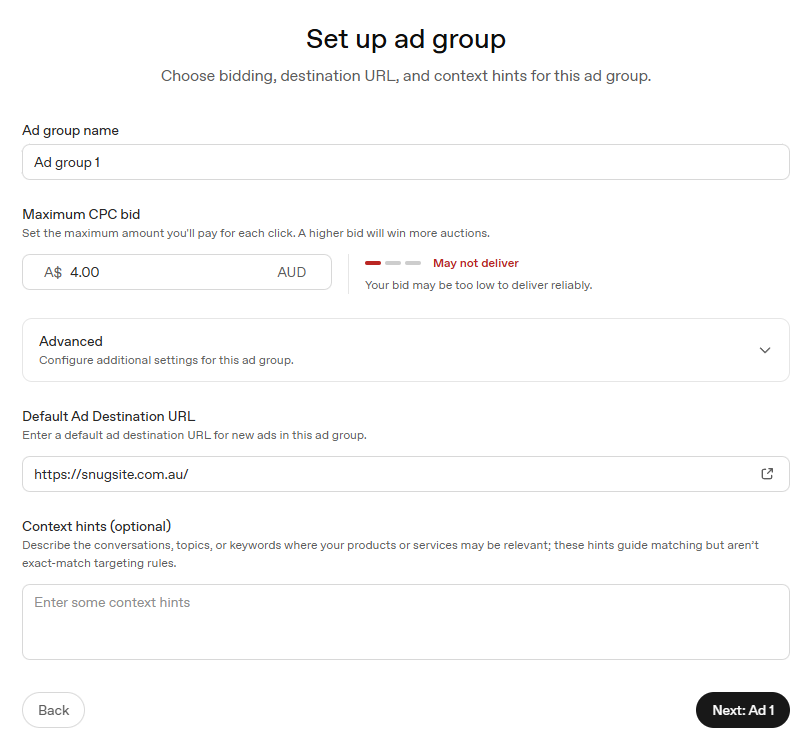
Setting the bid. The platform warns you in real time if your maximum CPC is too low to deliver – a red indicator appears showing your bid strength. In Australian dollars, you’ll likely need to be somewhere in the A$5-8 range to clear most auctions reliably. It’s a maximum, not what you necessarily pay – actual CPCs in second-price auctions usually land under your cap.
Writing the ad. One 50-character headline, one 100-character description, one square image. That’s 150 characters to make your case. The constraint is tighter than it looks – tighter than Google, tighter than most social formats. The instinct is to cram in location, experience, services and a call to action. You can’t. Pick the one thing the person in that conversation needs to hear and say it plainly.
A few contrasts that illustrate the difference:
Doesn’t work well: “Melbourne Web Design & WordPress Maintenance | 25 Years | Call Today” – too much, says nothing specific to the moment.
Works better: “Your WordPress Site, Looked After” – the person reading it is mid-conversation about a WordPress problem. The ad doesn’t need to introduce the topic; the conversation already did.
Doesn’t work well: “AI Services for Your Website – Chatbots, Content, SEO” – generic, sounds like every other AI vendor.
Works better: “AI for Your Website, Minus the Hype” – the person who clicks that is exhausted by breathless AI promotion, not excited by it.
One practical note: the headline preview in Ads Manager truncates at around 35 characters even though the field accepts 50. Front-load the important words.
Then submit for review and wait. OpenAI’s Ads Manager overview covers anything we’ve skimmed here.
Context hints
Every other part of the setup is familiar. This part isn’t.
Instead of keywords, you write “context hints” – plain English descriptions of the conversations where your business is relevant. OpenAI’s own description says hints “guide matching but aren’t exact-match targeting rules.” You’re not programming a filter. You’re briefing an AI on when your ad belongs in the conversation, and it makes the call from there.
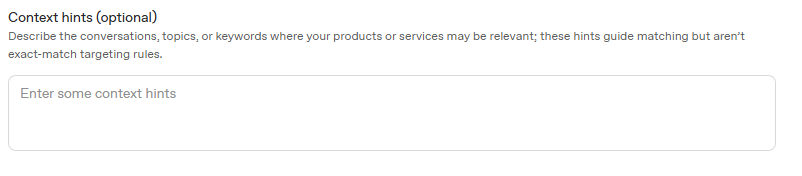
The input is a plain text box with no suggestions, no volume estimates, no autocomplete. You’re writing into a blank field and trusting the model – which is either liberating or unsettling depending on your relationship with ambiguity.
The key shift in thinking: write situations, not keywords. Someone mid-panic because their site broke after an update isn’t going to type “wordpress maintenance service.” But they will describe exactly that situation to ChatGPT in detail. That description is what your hint needs to match.
For our maintenance campaign, instead of “wordpress maintenance melbourne” we wrote things like:
“Business owners whose web designer has disappeared or stopped responding and who need someone to take over their existing WordPress site.”
“Someone asking whether it’s safe to update WordPress plugins or themes, or whose site broke after an update.”
“A business owner whose WordPress site has been hacked, is showing malware warnings, or has been flagged by Google.”
Here’s what that looks like across different business types:
A bookkeeper or accountant: “A small business owner asking how to keep track of GST, what records they need to keep, or whether they need an accountant or can manage their own books.” Not “bookkeeper near me” – a situation someone describes at 11pm when they’re stressed about their BAS.
A physio or allied health clinic: “Someone asking how long a sore lower back takes to heal, whether they should see a physio or a GP first, or what exercises help with neck pain from sitting at a desk.” The person in that conversation is a warm lead. They haven’t booked anything yet – but they’re describing a problem your clinic solves.
A tradie – say, an electrician: “A homeowner asking whether it’s safe to do their own electrical work, what an RCD is and whether they need one, or why their safety switch keeps tripping.” A worried homeowner is a much better prospect than someone who typed “electrician” into a search box.
The pattern is the same each time: describe the conversation someone is having with ChatGPT when your service is the answer. Think about what they’re anxious about, what they’re trying to understand, what decision they’re in the middle of.
A practical tip: when you hit that blank context hints box, ask an AI chatbot to help fill it in. Give it a description of your business and ask for six to eight hints describing situations your customers would be in when chatting with an AI assistant. Specifically ask for situations, not keywords – that framing matters. Yes, you’re using an AI to write targeting for an AI ad platform. That’s the new paradigm.
One thing to avoid: don’t write hints like a keyword list. “WordPress maintenance, website updates, WordPress security, WordPress backup” gives the model almost nothing to work with. Write sentences. Describe people in moments. The matcher is a language model; give it something to reason from.
What we’re hearing
We’re one campaign in, so it’s worth combining our own experience with what the SEO and tech community has been reporting since the beta opened.
Targeting is coarse – there’s no suburb or city-level targeting yet, so a Geelong plumber’s ad can show to someone in Darwin. Your ad copy has to do the geographic qualifying that Google’s location targeting would normally handle. Reporting is thin: you never see which conversations triggered your ad, so if a campaign underperforms, diagnosing why is mostly guesswork. Results in the first couple of months have varied wildly – some advertisers reporting barely any impressions after days of running, others landing signed clients within a fortnight. And there are the usual beta rough edges: occasional platform outages, and a temporary authorisation hold on your card when you set up billing (we saw around A$150, released within a few days).
The counterpoint worth making: the platform is moving fast. Things advertisers were complaining about two months ago were fixed by the time we went through setup. What’s missing today probably won’t be missing next quarter.
Should you try it?
That depends on where you’re starting from.
A good candidate right now: You’re a service business with a working WordPress site, GA4 already connected, and $200-$500 you’re comfortable treating as an experiment. You have a clear service to advertise – maintenance, bookkeeping, physiotherapy, legal advice – where the customer is likely mid-problem when they turn to ChatGPT. You can describe your customer and what they’re worried about in plain English. You have someone (or a plugin) keeping an eye on the campaign.
Probably worth waiting: Your site isn’t properly set up yet – no GA4, no clear landing page, no conversion tracking. Your budget is under $100 and you need reliable, measurable return. You need granular geographic targeting (it’s country-level only for now). Or you simply don’t have time to monitor it – a campaign no one is watching is money leaving quietly.
For anyone in the first group: treat it as research and development. Set a modest budget, tag your links, check GA4 weekly, and see what the traffic actually does. Worst case, you’ve learned how the next generation of advertising works before your competitors have heard of it.
What actually happened after six days and $100
We ran two campaigns: one targeting people asking ChatGPT about WordPress maintenance, and one targeting people feeling overwhelmed by AI advice for their website. After six days we paused both – $100 is real money, and we had enough data to say something honest.
The numbers: 7,720 impressions, 33 clicks, A$102 spend, A$3.09 average cost per click, 0.43% click-through rate.
The AI Focused campaign surprised us. We’d worried it would attract tyre-kickers and AI enthusiasts rather than actual prospects, but it delivered 6,743 impressions and 31 clicks at A$3.03 per click – the cheaper of the two campaigns, and by far the higher volume. The maintenance campaign was quieter: 977 impressions, 2 clicks at A$4.07 per click.
What GA4 showed: The maintenance campaign clicks showed up cleanly as chatgpt / cpc – both sessions with 100% engagement and an average of 6.5 pages browsed, which suggests genuinely interested visitors. The AI Focused campaign clicks came through as chatgpt.com / referral, and cross-referencing against the AI services page session count gave us roughly 44 above-baseline visits during the campaign period. GA4 also showed 6 organic sessions from chatgpt.com / ai-assistant running alongside the paid traffic – people ChatGPT sent us without any ad involved at all.
The enquiries: We believe two genuine enquiries came through during the campaign period, one connected to each campaign. The conversion pixel was in place but recorded zero conversions, which suggests the thank-you page event didn’t fire correctly – something we’d troubleshoot before the next run. What we can say is the timing lines up, the traffic quality looked right, and neither enquiry came from channels we’d expect to suddenly spike.
The verdict: For A$102 we got 7,720 appearances in relevant conversations, 33 clicks from people who’d just described a problem we solve, two probable enquiries, and a thorough education in how the platform works. That’s a reasonable R&D return. We’re not claiming it’s a reliable lead source – one week isn’t enough data for that – but nothing in the numbers suggests it shouldn’t be.
We paused because $100 a week adds up for a small agency, not because we’re done. We’ll run it again when we’re ready to commit a proper test budget, and we’ll report back with whatever the numbers say.
Useful links
- OpenAI Ads Manager – sign up and build campaigns
- Ads Manager overview – OpenAI’s help centre starting point
- Account setup guide – read before creating your account; some settings can’t be changed afterwards
And if you’d rather have someone set it up properly – the pixel, the context hints, UTM tagging, and the GA4 reporting to tell you honestly whether it’s working – that’s something we can help with. Get in touch and we’ll have a chat about whether it makes sense for your business (currently available to our WordPress Maintenance customers).